Stop Your Dealership From Missing Mobile PPC Leads

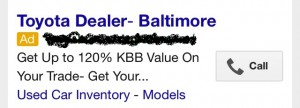
When you’re looking for a local business on your phone, how often are you in a position to write down a phone number, and then call?   It’s much easier to click the number of the business and have your phone call automatically – it seems obvious.  Did you know that less than 40% of car dealer’s PPC ads use this click-to-call functionality?

Using Click-to-Call in your PPC ads is especially important because it gives a clear call to action for consumers, and also allows your dealership’s ads to use the full text space. Since Google uses the click and call through performance of your ad when determining your Quality Score and cost per click, allowing viewers to convert from the search results page can provide your dealership with a huge boost in your PPC ROI.  Also, Google doesn’t allow phone numbers in the PPC ad copy, so using the Click to Call ad extensions they offer will add a “Call” button in your ad.

According to Google Think Insights, over half of auto searchers would be “very likely” to use click to call for parts/services or vehicles if the option were available.  Your dealership should be using click to call on your dealership mobile website (regardless of whether you use adaptive or responsive design).

Once your dealership has set up to click to call on your site (or in your PPC ads), make sure they are configured properly and are defined as goals in your Google Analytics.  If your website is not set up this way, and you’d like to have a website that automatically tracks all of your mobile calls via Google Analytics, we can provide you with a website that has that capability.  This will also help your dealership to more accurately track phone calls and the ROI of your online marketing efforts.  Your dealership website provider should be able to help you set this up.  Lastly, make sure you regularly test your click-to-call links across multiple devices to make sure they work on all devices and ensure your dealership isn’t missing leads.

How to Build Trust With Service Customers From the Start

The fixed operations department in the average dealership generates over 50% of a typical dealer’s  gross profit, according to NADA. Since this is where you make most of your money, it’s important that you do everything you can to turn each and every visitor to your service lanes into loyal, return customers. While your fixed ops staff may have a game plan once those customers visit your service department, how can you influence their opinion of your dealership from their first interaction online?

Whether you have a dedicated service website or are making the most of the service pages on your traditional website dealership site, here are some tips to use the online presence of your service department to help instill trust before customers get into your service lane.

Build Trust From the Start – When a potential customer interacts with a call to action on your website, make sure your dealership staff responds in the way that is promised. Did they request a service appointment? Ensure the email/phone call references the information your potential customer has already volunteered.

Show Them Your Staff – Let service customers see a familiar face when they come into your service lane. Maintain your dedicated staff page and add a little bit of information about each technician. This could include their certifications and years of experience. This may help visitors build a connection with your staff before they walk in the door.  Another benefit of posting your service techs certifications and qualifications on your website also builds value for using YOUR service department as opposed to one of the national service brands that don’t have staff with comparable levels of experience and expertise.

Give a “Walk-Through” Online – Post pictures of your service department as well as what to expect from a typical service appointment. Help potential customers feel more comfortable choosing your dealership’s service department by showing them around online.

Help Keep Them on Track – Does your website have scheduled maintenance information readily available? This type of information helps set your dealership website apart from the national service brands, and helps build trust with potential consumers. Try adding videos explaining what will happen at each interval for added benefit.

Make It Easy – Reduce as much friction as possible through your website. Are your service hours accurate? Does your service scheduler work properly if your dealership offers one? Do you offer loaner vehicles or is there a shuttle service? Try to answer typical questions online.

If your fixed ops website can make your service customers comfortable before they visit your service department, you’re one step ahead in converting that quick oil change into a lifelong service customer.

How to Use Google Analytics Reports to Speed Up Your Website

We all know that one of the most important traffic sources for the typical car dealer website is Google’s organic search listings.  Google has made it very clear that one of the most important factors in determining where your dealership’s website content ranks on Google is the speed at which that page loads for their users.  Google has stressed that the page load time is an EVEN bigger factor for mobile rankings than for traditional desktop search results.  Did you know that Google Analytics has a Site Speed Page Timings report that shows you the speed for EVERY page on your site in one easy report?

Over the last few weeks, we have written about Google’s site speed insight tool that can show you or your website provider how to lower the load time of a particular page on your site.  But how can you get information about which pages you should check?  The Google Analytics Site Speed Page Timings report shows you Google’s calculated load time for EVERY page on your site, along with the amount of traffic each page receives, and what the Bounce Rate is for that page!


Page Timings Report:

Here is an example of the Google Analytics Page Timings report.  To access the report in your Google Analytics account, just click through on “Behavior>Behavior Flow>Site Speed>Page Timings”.  You will get a report that looks like this:
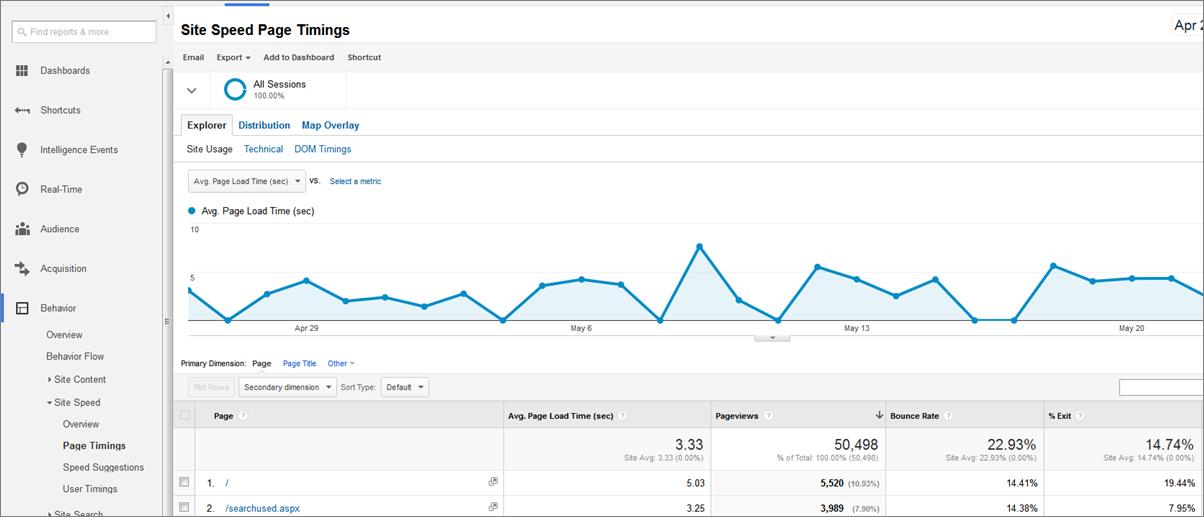
For every page on your site, the report shows:

  1. The time it take to load the page in Seconds
  2. The # of page views during the time period for which you’ve run the report
  3. The Bounce Rate for the page
  4. The Exit Rate

If you use the sort functionality within the report, you can focus on the pages with the highest Load times, the Most Traffic, or the highest Bounce Rates.  You can easily identify the highest trafficked pages on your site that also have high Bounce Rates, and see if the load times for those pages are part of the Bounce Rate problem.

You can even filter this report to just show Organic Search traffic and use “Landing Page” as the Primary Dimension, which will then show you the actual load time for consumers coming to your website from Google or Bing.  Because you also have the Page Views, you can easily focus on the pages with High Load Times, High Bounce Rates and High Traffic volumes, helping you to get the most return from your time investment.

Because page speed is an even more critical SEO factor for mobile, this report REALLY becomes valuable if you filter the traffic to show only Mobile Visitors.  When you create a report that shows pages that have lots of traffic, high bounce rates, and high load times for Mobile traffic, you can use the Google PageSpeed Insights Tool to get actionable information on how to speed up the pages that will provide the most value to your dealership if you optimize them (because they have the most inbound traffic).

If you are investing a material amount of money in paid search advertising, you should run this same report, filtered on your paid search traffic.  You can then isolate any landing pages that are problematic from a Speed/Bounce Rate view.  Once you’ve isolated the problem landing pages you could send the traffic to a similar, but faster landing page with a lower bounce rate, invest some time in fixing the current landing page, or pause the campaign until you have time to improve your results.


Speed Suggestions Report:

If you just want to see a list of pages with their accompanying Google Page Speed scores, you can click on the “Speed Suggestions” report just below the “Page Timings” report and get a list of all the pages in your site, sorted by Page views, with the accompanying Google Page Speed score (0-100) and a link to the Google Insight suggestions for improving the page speed.

Google is continuously improving Google Analytics to provide insight into how Google evaluates your site’s content for its organic search rankings and paid search traffic.  Make sure that you aren’t overlooking this free tool that can help you, your website provider, your SEO guru, or your paid search vendor maximize your dealership’s return on their time and efforts.


Have Google Check Your Mobile Site for Speed & Usability

Google’s announcement yesterday about the launch of their new PageSpeed Insights’ User Experience rules is really driving home the importance of usability and site speed on your mobile website.  They’ve previously discussed how important the speed at which your website loads (both desktop and mobile) is to their algorithm – site speed can impact the ranking of a website on Google’s SERP, as well as the likelihood of visitors to leave your site.  But at the end of the day, a fast loading site can only take you so far, especially when it comes to mobile devices.

Google is quick to point out that it is not enough to have a fast mobile website if your mobile site is not configured appropriately.  That means that users shouldn’t “have to spend another 5 seconds once the page loads to pinch-zoom and scroll the screen before they can start reading the text and interacting with the page,” because “then that site isn’t really fast to use after all.”  In other words, your mobile site needs to automatically adjust to each device.  One of the easiest ways to solve this problem is to make sure your dealership has a responsive website.

To help web developers improve the user experience on their sites, Google has launched the new PageSpeed Insights’ User Experience rules that identify and provide suggested fixes for usability issues for mobile sites.

These rules cover such things as:

  • Font Size – make sure users can read your content without having to enlarge or diminish the screen.
  • Plugin Use – since most smartphones don’t support Flash, make sure mobile users can see the most important parts of your site. If plugins carry the value and content of your dealership website, your mobile users will miss the most important information.
  • Scrolling – mobile website visitors are accustomed to scrolling vertically, not horizontally. If you aren’t using a responsive dealership website, make sure your mobile site fits the width of the device it’s designed for.

You can use the PageSpeed Insights tool to test both your desktop and mobile pages. Stay ahead of the curve (or make sure you’re caught up) by checking your mobile pages now. Many dealerships are already seeing the majority of their traffic come from mobile devices (tablet, smartphone, etc), so it’s especially important you’re presenting those visitors with the best experience possible.

While having a responsive dealership website will solve many of the usability issues your site may have, it won’t fix them all if you have a bad design. Check your mobile website regardless of the technology it is built upon.

A Chance to Give Yelp Your Input

Yelp has been making a lot of news recently.  Yesterday they announced that they have rolled out a new feature that alerts a business when Yelp detects that their company is receiving multiple reviews from the same IP address (for instance the IP at your dealership).  Just to remind everyone, Yelp’s official stance from their blog is “we encourage businesses to take a hands off approach when it comes to receiving reviews”.


Historically, dealers have not had the greatest experience with Yelp.  You don’t have to search long to find real-life stories about problems dealers have had working with the review service.  In the dealership world, Yelp is often talked about, rarely praised (see here, here, and here).

Last week, Johnson & Weaver, a shareholder rights firm, announced that they are launching an investigation into Yelp’s business practices, specifically focusing on the validity and authenticity of the reviews of local businesses that Yelp displays on its site, mobile site, and mobile app.  This announcement comes just a few weeks after the Wall Street Journal reported that Yelp has received over 2,000 FTC complaints in the last 6 years.

Perhaps in response to some of the recent publicity, Yelp announced Tuesday, using their official blog, that they are looking for help from small business owners – new members for the Yelp Small Business Advisory Council (YSBAC). Created in 2010, this panel gets to:

  • Participate in an annual summit at Yelp HQ
  • Provide input on products under development
  • Brainstorm new ideas for Yelp executives to consider
  • Serve as a resource for other business owners who have questions about the services and tools on Yelp


According to Yelp, the YSBAC has had a hand in the following improvements:

  • “Yelp Metrics” being launched to help business owners track customer leads
  • Business owner review comments being visible on mobile
  • Development of the free “Revenue Estimate” tool to calculate the value of leads from Yelp
  • The “Activity Feed” to track when and how Yelp drives customers to businesses


I think that we’re all fairly skeptical of Yelp’s intentions in reaching out to local business owners, given the challenges I’ve described above.   Regardless of our industry’s recent experiences with Yelp, they are a multi-billion dollar company that remains the leading local business review website.  So if you’re interested in participating in their YSBAC to influence and shape Yelp’s treatment and relationship with local businesses in the future, there is a simple, 9 question form, that you can complete.  Last year, 26 small business owners were chosen from the over 1,000 business owners that applied to participate.


Would you like to share your dealership’s experiences with Yelp?

Call support
(877) 543-4200
Call Sales
(877) 543-6321

Reserve your Demo for NADA 2026 IN LAS VEGAS NEVADA.

 Register Now